A new look for your tours: business card, themes and an automatic guided tour
In May we shipped a major update that changes how your clients experience a virtual tour. Every tour can now look as if a professional agency made it: with your logo, in your brand style and with your contact details clearly visible.
A business card in the tour
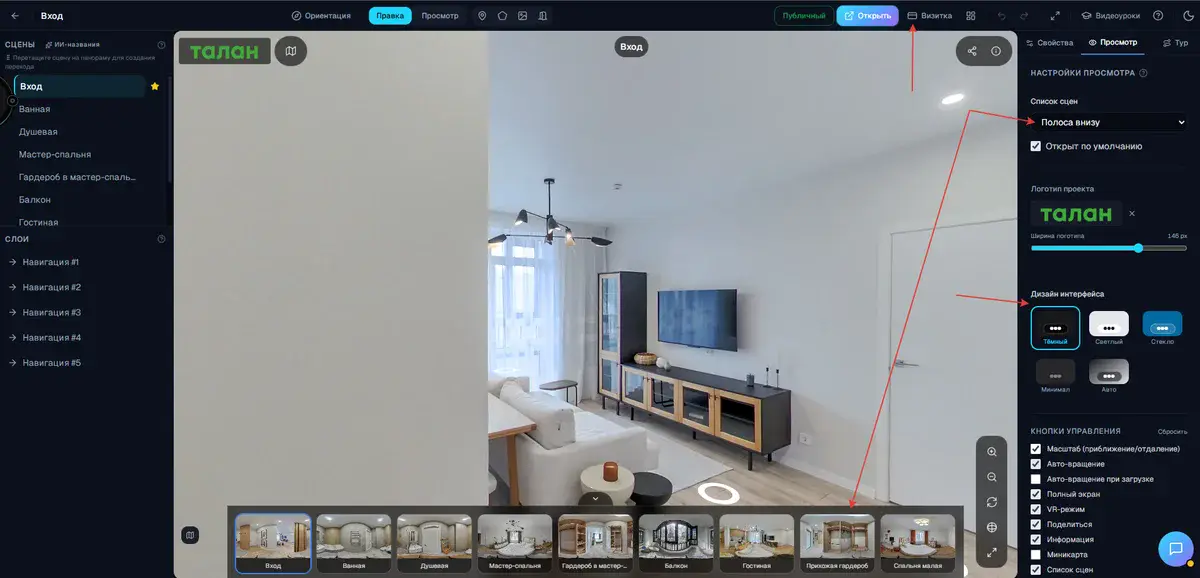
One of the most common questions from real estate agents and photographers is: "How will the client know who made this tour?" Now the answer is simple. The tour interface has a new Business card button that opens your company card: logo, phone, email, website and links to social networks.
You decide what to show. You can also have the card appear automatically when the tour is first opened, which is especially useful for presentations at property viewings or trade fairs.
Five themes
The tour interface used to look the same every time. Now you choose from five ready-made themes:
- Dark: a sleek, professional look that suits premium properties.
- Light: clean and airy, great for residential properties and hotels.
- Glass: a semi-transparent effect with a soft background blur. Modern and stylish.
- Minimal: as few controls as possible, as much panorama as possible. For tours where atmosphere matters.
- Auto: the theme follows the system settings of your client's device.
The theme applies instantly and is saved separately for each project.
A logo with adjustable size
You can now place your company or agency logo in the top left corner of the tour. A slider sets the size, from a small, discreet badge to a prominent branded banner. It all depends on how visible you want your brand to be.
Redesigned scene panel
The panel with scene thumbnails at the bottom of the tour has a new design. It opens and closes smoothly with a single tap, and the toggle button always stays visible, even when the panel is closed. Moving between rooms is more convenient, especially in large properties with many rooms.
The guided tour button
A new button starts an automatic tour through all panoramas in order. The client presses one button and the tour leads them through the property on its own, with no need to click navigation points. That is handy for presentations, trade fair booths or simply a first look at a property.
On desktop the button appears as a separate element above the scene panel; on mobile devices it is built into the control bar so it does not take up extra screen space.
Try it now
All the new features are available in the project editor. Open the tour settings, pick a theme, add your business card and logo: it takes less than five minutes. Your clients will see the refreshed, professionally designed tour the next time they open the link. No account yet? Sign up here.
Try it with your own project
Create a free account and build your first tour — paid plans are set up on request.
Create a free account →