Upload cubemap panoramas from PTGui, Hugin, Insta360 and more
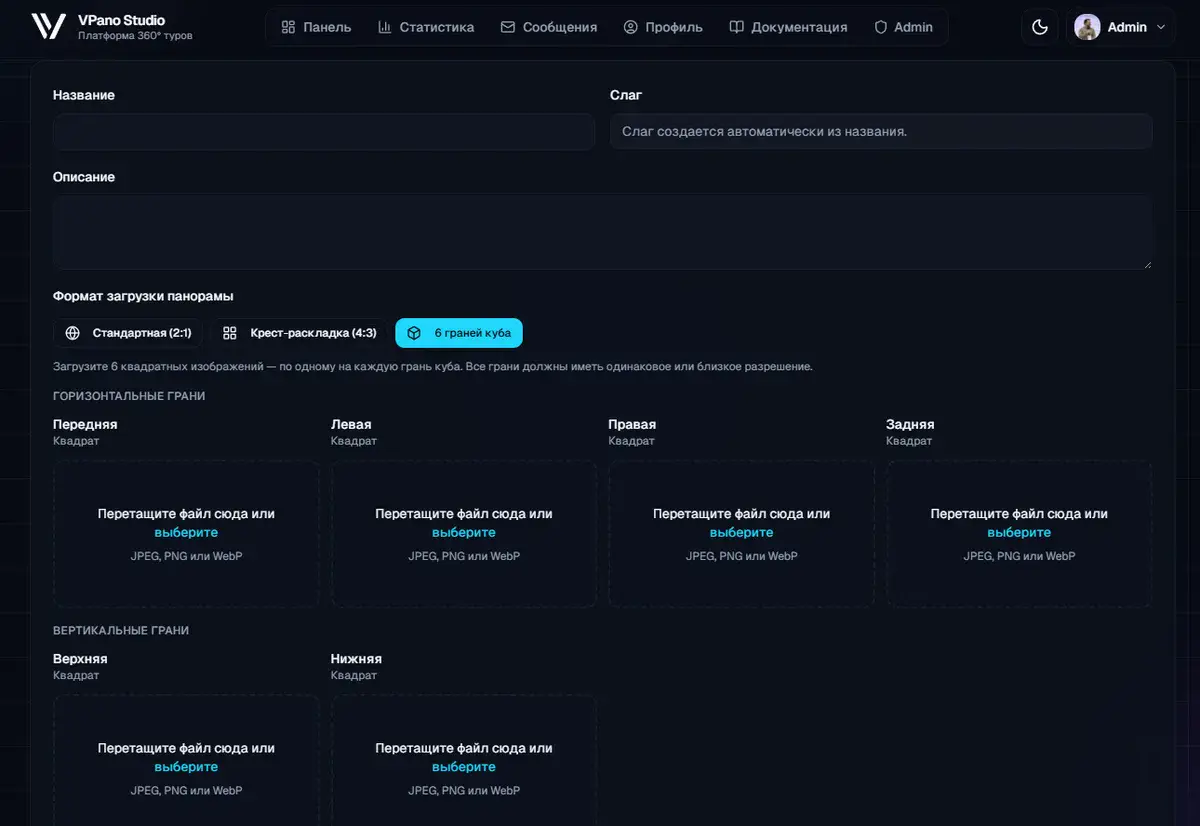
If you stitch panoramas in PTGui, Hugin, Insta360 Studio or other professional software, you can now upload the result directly, with no manual conversion. Just choose the format when uploading and the system does the rest.
What is a cubemap projection?
Most professional stitching programs do not work with a spherical projection but with a cubic one: the image is split into six square faces of a cube, namely front, back, left, right, top and bottom. This format produces less distortion during stitching and is easier to retouch.
Until now, publishing such a panorama on VPano meant converting the cubemap into a spherical image by hand first. That step is gone: the conversion now happens automatically on the server.
Option 1: cross layout (one file)
A cross layout is a single file with a 4:3 aspect ratio in which all six faces are packed as an unfolded cube. It is the standard export format of:
- PTGui: Export → Cube faces → Cross layout
- Hugin: batch export with the Cube Cross template
- KartaVR (Fusion/Resolve): LatLong to Cubemap → Cross
Upload such a file via New panorama → Cross, and the panorama is ready within seconds.
Option 2: six separate files
Some programs export each cube face as its own file. This format is used by:
- Insta360 Studio: Export → Cube Map Faces
- GoPro Player: Export → Cube Face Images
- Agisoft Metashape: Export Panorama → Cube Faces
- RealityCapture: Reconstruction → Export Cubemap
- KartaVR: Cube Face Splitter node
Upload all six files via New panorama → 6 faces, and the system assembles and converts them into a panorama automatically.
How to upload
- Open the Panoramas section and click New panorama.
- Under upload format, choose the mode you need: spherical, cross (4:3) or 6 faces.
- Upload the file or files. Conversion and publishing happen automatically.
Resolution
Cubemap uploads are subject to the same resolution limits as regular spherical panoramas.
No account yet? Sign up and upload your first cubemap.
Try it with your own project
Create a free account and build your first tour — paid plans are set up on request.
Create a free account →